For streamers and casters
A broadcast stream overlay, ready in a minute
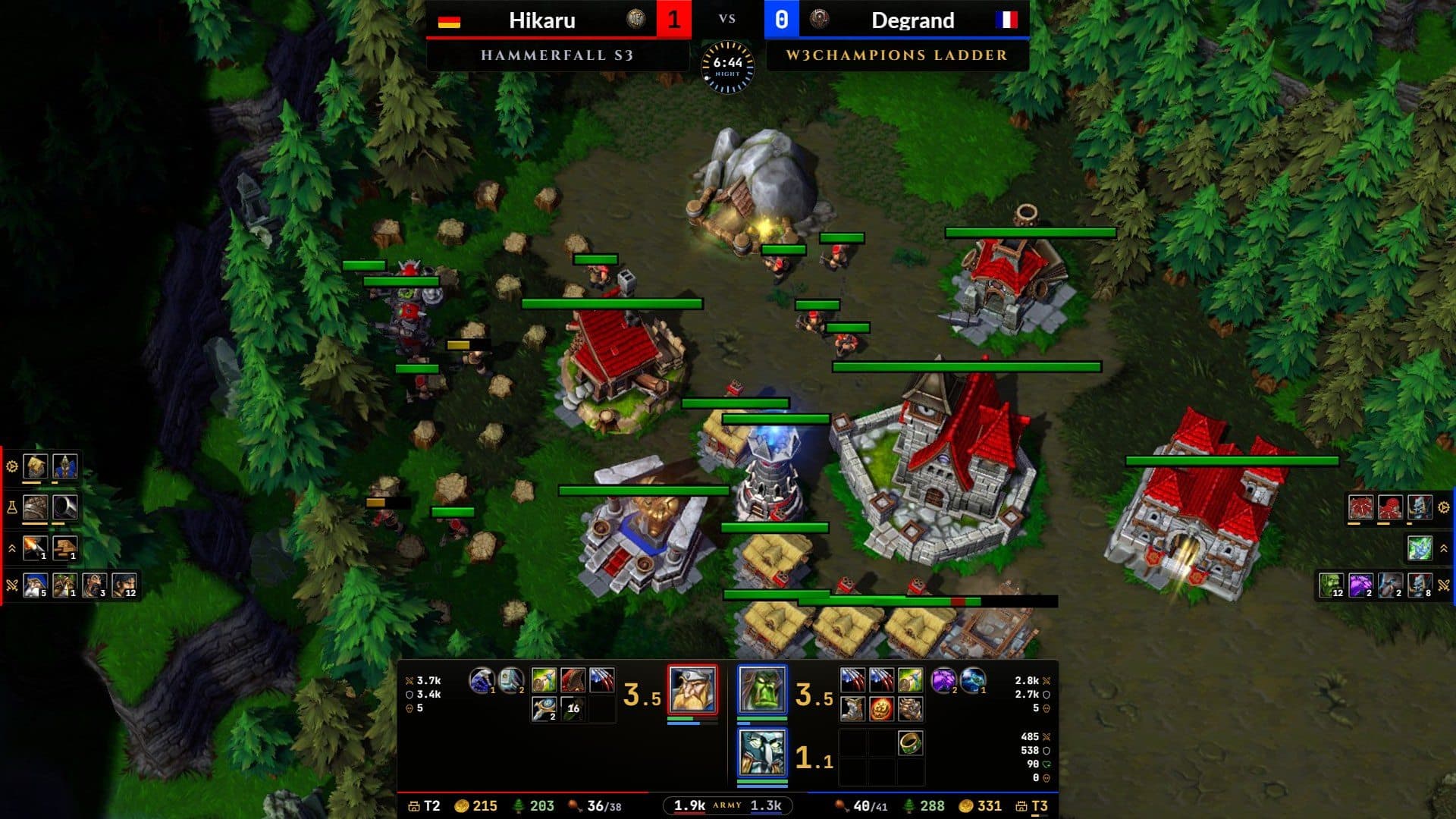
Observe a game or play a replay and the stream overlay fills itself from the game: heroes, items, armies, production and resources, for both players, as it happens. Free, in OBS or on your own screen.
In OBS or on your screen
Add it to OBS as a browser source for your viewers, or show it over the game for yourself. One layout drives both.
Six presets, 36 panels
Score bar, hero console, resources, armies, production, tech race, logs, player cards with flags, Twitch chat. Add, hide or move any of them.
Arrange it on the game
Drag panels over the game with alignment guides and snapping, or right-click a panel to hide, remove or add one.
Your event, your look
Your event name, sponsor line, logo and colours, saved as layouts you can export and share.
Recaps that tell the story
A fight recap after each fight and a match recap at the end: losses, heroes, items and the value advantage over time.
Live value advantage
Army, buildings and research at cost, charted live, so viewers see who is ahead.
Presets
Six layouts, one click
Start from the preset that fits your cast, then add, hide or move any panel.
Tournaments and casts. A pro cast: the score bar on top with the clock, the map and your subtitle, the hero console with resources and army values over the game's own console, and on each edge a strip of what is being made and researched, the upgrades and the units alive.
The game's classic observer screen. For the classic observer screen (not Advanced): each player's resources on the top edge with the score bar and the clock between them, their army and what they are producing down their side, both armies' value under the clock, and their heroes in the bottom corners, which that screen leaves free. The game's bar in the middle of the bottom edge stays clear.
Showmatches and fun streams. Everything side by side: the score bar with head to head under it, both armies' value as a tug of war, the heroes face to face over the game's console, the kills down the left edge and the items down the right. The middle stays clear for the fights.
Lessons and replay reviews. To teach from a game: what each player trains, researches and builds, down their edge; their tech race (tier and research) under the score bar; their heroes with skills and items in the console.
Stats and analysis. The numbers, each once: both armies' value under the score bar, each player's units alive and lost down their edge, who is ahead in gold, lumber, food, mining and workers under the left one, and the resources strip on the bottom edge. The middle stays clear for the fights.
Simple, room for a facecam. The simplest: only the score bar on top and a slim resources strip with the army values on the bottom edge. The game stays uncluttered and both edges stay free for a facecam.
Customise
Make it yours
35 panels to choose from, each where you want it, in your event's colours. Here is everything you can change.
The panels
Score and players8
- Score barNames, races and the series score
- ClockThe game clock with its day and night ring
- MapThe map's name
- SubtitleYour own line, like the round or the group
- Head to headBoth players' numbers face to face
- Player cardper playerFlag, race, rank and record
- EventYour event's name and sponsor line
- LogoYour logo on its own
Heroes6
- ConsoleHeroes, skills and items over the game's console
- Console heroesOnly the console's hero rows
- Heroesper playerLevel, health, mana, skills and items
- Heroes, compactper playerSmall portraits with level and health
- Hero cardsper playerOne card per hero, with portrait and stats
- Hero matchupBoth players' heroes face to face
Army7
- Armyper playerUnits by type, with counts
- Army iconsper playerThe army as a row of unit icons
- Units alive and lostper playerEach unit type, alive and lost
- Supply splitper playerFood on workers and on the army
- Units aliveper playerUnits alive, with counts and workers
- Army valueBoth armies' worth, as a tug of war
- Value advantageWho is ahead over the game, as a chart
Economy5
- Console stripTier, gold, lumber, food and army values
- Resourcesper playerGold, lumber, food and upkeep
- Incomeper playerGold and lumber per minute
- Resource totalsGold and lumber gathered so far
- Resource differenceWho is ahead, and by how much
Production5
- Upgrades and unitsper playerWhat is being made, along the screen edge
- Productionper playerWhat each building trains and researches
- Tech raceper playerTier and research progress
- Queueper playerUnits and research queued, with progress
- Upgrades doneper playerThe upgrades each player has done
Logs and notifications4
- Kills logWho killed what, creep camps included
- Items logItems picked up or bought
- Twitch chatYour channel's chat, read only
- NotificationsRecap buttons, on your screen only
And everything around them
Arrange it your way
- Drag a panel to move it, drag its corner to resize it, or use the arrow keys
- Gold guides snap panels to each other's edges and to the centre
- Bring a panel to the front or send it back where panels overlap
- Hide a panel and it keeps its place; remove or add any panel
- Arrange it right over the game, or right-click a panel there
- The game's console and minimap are marked, so you don't cover them
- Fits 16:10 and 4:3 screens. On ultrawide screens, side panels can stick to the far edges
Your event's look
- Themes with five colours (panel, accent, text, muted text, border) and background opacity
- A contrast check warns when text may be hard to read on stream
- Event name, sponsor line and stage, each shown or hidden
- Your logo on the score bar (centre, left or right end) or in its own panel
- Export and import up to 20 themes as a file
Panels with options
- Head to head: compare 2 to 4 of gold, lumber, food, APM, army value and workers
- Income: trend lines on or off
- Hero matchup: 1, 2 or 3 heroes per player
- Map and subtitle: four text sizes
- Player card: first heroes and average game length
- Twitch chat: your channel, its text size, and who sees it
Where it shows
- My stream, just me, both, or hidden with your layout kept
- Add to OBS in one click (OBS 28 or newer), or paste its address as a browser source
- Separate sources for the match and fight recaps
- On your screen: snap to the game, click-through, opacity 30 to 100% and scale 0.5 to 1.5x
Recaps
- A fight recap offered after each fight; small fights and creeping left out
- The match recap whenever you open it, for 15, 30 or 60 seconds or until closed
- Recent match recaps listed, to show again
- Open them from the app, a shortcut or the Notifications panel
Series and players
- The series score for each side, and swap sides
- A subtitle for the round or the group
- Each player's flag, found automatically or picked
- Each player's W3Champions BattleTag, automatic or searched
Save and share
- Up to 30 saved layouts, with their panels, places and options
- Export your layouts to a file and import them on another computer
- Shortcuts to show the stream overlay, arrange it and open the match recap, all changeable
- A demo game to set everything up before you go live
Recaps
Every fight, told for your viewers
A recap after each fight and one at the end of the match, ready to show between the action.
The stream overlay studio
Set it up in the app
Presets, panels, your event's look and where the stream overlay shows, in one place; right-click any panel on the game to change it.
Add it to OBS
On air in three steps
- 01
Show it on your stream
In the app, open the Stream overlay tab and choose My stream (or Both, to see it over the game yourself too).
- 02
Add it to OBS
Click Add to OBS and the app adds the source to your open scene (OBS 28 or newer). Or paste the stream overlay's address as a Browser source, 1920 x 1080.
- 03
Observe and cast
Pick a preset or arrange your own, then observe a game or play a replay: the stream overlay fills itself, and OBS follows every change.
Also in W3 Companion
One app, every game
Build orders
Your build, floating over the game, in sync with its clock.
Scouting
Your opponent's form, records and habits as the game starts.
Game reports
What won it or what cost it, with the numbers behind it.
Profile
Your strengths, your matchups and your MMR line.
Achievements
Over 270 painted badges, bronze to diamond.


Download
Ready for your next game?
Free for Windows 10 and 11. Always the latest release, and installed copies update themselves.
Or browse every release on GitHub.