Battle.net








Ladder wins
Iron · Zug zug
Win 10 ladder games.
Win 50 ladder games.
Win 100 ladder games.
Win 250 ladder games.
Win 500 ladder games.
Win 1000 ladder games.

For Warcraft III players and casters
Build orders floating over the game, a card on your opponent before the first worker moves, an honest report after every game, your profile and achievements, and a full stream overlay for casting. Free, and it runs on your computer.
Free · version 0.2.31 · Windows 10 and 11 · updates itself
Works with Battle.netLANCustom games
Every step and its time, floating over the game, in sync with its clock.
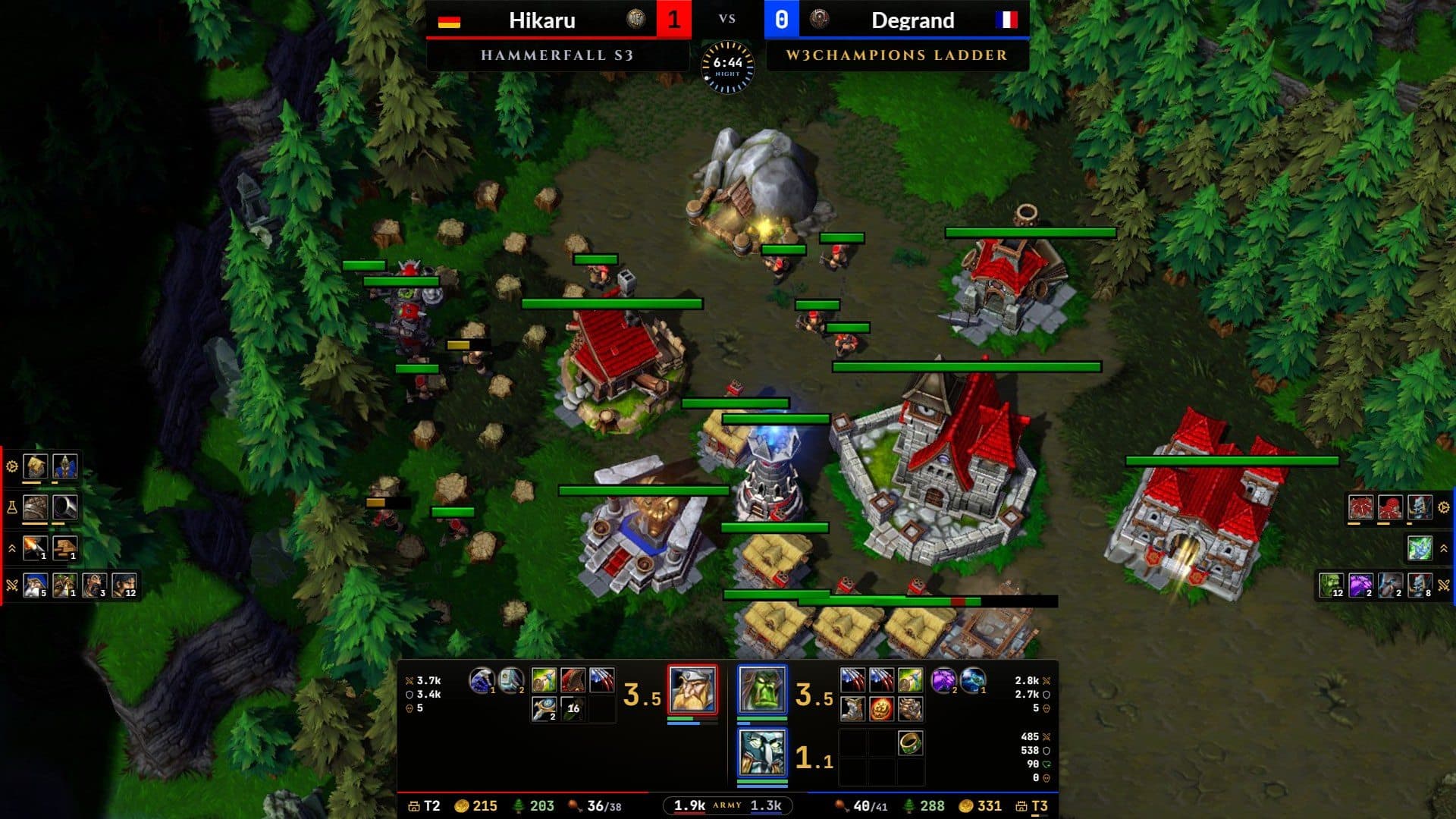
Your opponent's form, records and habits, on screen as the game starts.
What won it or what cost it, with the numbers behind every line.
A broadcast stream overlay for OBS or your screen, filled live from the game.
For players
From the moment the game loads to the profile that tracks how you play: one app, on your computer, for every game you play.
01Before your game
Scouting
When a W3Champions 1v1 starts, a card on your opponent opens over the game, built from their public ladder history and score sheets.
02During your game
Build orders
A small panel stays on top of Warcraft III with the step you are on, its time and the next ones. Its clock follows the game by itself, and your clicks go through it to the game.
03After your game
Game reports
After each game the app reads the replay, and the W3Champions score sheet when there is one, and tells you what won it or what cost it, with the numbers behind every line.
04Between your games
Profile
Your MMR and its line, your strengths and what to work on from your last games, your matchups, maps, game lengths and first heroes. Search any player on W3Champions for a quick look at theirs.
Achievements
Painted badges for what you do in your games: milestones, upsets, score sheet feats, habits and rivals. 44 of them climb five tiers, so there is always a next one. Earned in your 1v1 ladder games on Battle.net and W3Champions, and kept for good.
Iron · Zug zug
Win 10 ladder games.
Win 50 ladder games.
Win 100 ladder games.
Win 250 ladder games.
Win 500 ladder games.
Win 1000 ladder games.
Built for the Warcraft III community, and with it: players’ ideas shape every update, because the goal is simple, a better Warcraft III to play and to watch.
Share
Your profile, a game report or an achievement, as a picture: press Share, Copy picture, then paste it in Discord with Ctrl+V. Made on your computer; the picture is not uploaded anywhere.
For streamers and casters
Observe a game or play a replay and the stream overlay fills itself from the game: heroes, items, armies, production and resources, for both players, as it happens.
Fair play and privacy
In your own games the app never shows what the game hides from you: no enemy units, no fog of war, no enemy resources. The opponent card uses public ladder history from before the game. The full picture appears only when you observe a game or watch a replay.
Replays are read on your computer and never uploaded. There is no account to make: the app reads W3Champions' public ladder data for your BattleTag, if you add one. Only if you join the leaderboards does it send your name, flag, race and achievements.
The app counts launches, which features are used and when something goes wrong, with no names, BattleTags, builds, replays or files. Turn it off any time in Settings, Privacy.
Every feature is free. If the app helps your games or your casts, you can support it on Ko-fi.
Questions
It shows only what you could find yourself: your build, your opponent's public ladder history, and after the game your own replay. During your games it never reads or shows anything the game hides from you.
No. Build orders, reports and the stream overlay work without one. Your profile and achievements need your BattleTag (Battle.net players too) and come from your 1v1 ladder games in your replays. With W3Champions you also get your MMR, rank, the score-sheet findings and the opponent card.
Open the Stream overlay tab, choose My stream or Both, then click Add to OBS (OBS 28 or newer), or paste the stream overlay's address into OBS as a browser source (1920 x 1080). Pick a preset or make your own layout; OBS follows every change.
Nothing until you join: Settings, Profile & reports, Show me on the leaderboards. Then your BattleTag (the site shows the name without its number), flag, main race, and for each achievement you unlocked its date, which ladder it came from (W3Champions or Battle.net), and your progress counts. Turning it off deletes all of it at once.
Not yet: today W3 Companion is for Windows 10 and 11.
Download
Free for Windows 10 and 11. Always the latest release, and installed copies update themselves.
Or browse every release on GitHub.